Thứ Ba, 10 tháng 3, 2020

Tìm hiểu Domain Driven Design (DDD)

Trong thiết kế kiến trúc Microservice, có thể bạn sẽ được nghe nhiều về thuật ngữ Domain Driven Design, một phương pháp thiết kế phần mềm theo hướng business domain. Phương pháp này được giới thiệu bởi Eric Evan, viết thành một cuốn sách dày cộp bán trên Amazon, mình đã đọc cuốn sách này cả phiên bản tiếng Anh và tiếng Việt. Tuy nhiên câu từ trong cuốn này xác cmnd là éo hiểu gì, chữ viết như giun bò, kiến chạy, dài dòng lê thê, có lẽ cỡ như Bill Gate mới hiểu được.
Thế rồi một đêm xem xvideo, lướt vài vòng webtretho nghe các mẹ tâm sự chuyện tâm sinh lý, mình mới chợt ngộ ra bí ẩn trong cuốn sách của Eric Evan, quả là một bầu trời kiến thức, bài viết này sẽ mô tả lại phương pháp này một cách giản đơn, để cỡ như JAV idol như Yuina Hatano cũng hiểu được

Vì sao lại đẻ ra DDD (Domain Driven Design)

Giả sử một anh dev được giao nhiệm vụ phát triển một ứng dụng bán hàng online. Thanh niên coder thì sẽ áp dụng mô hình quen thuộc MVC hay MVVM
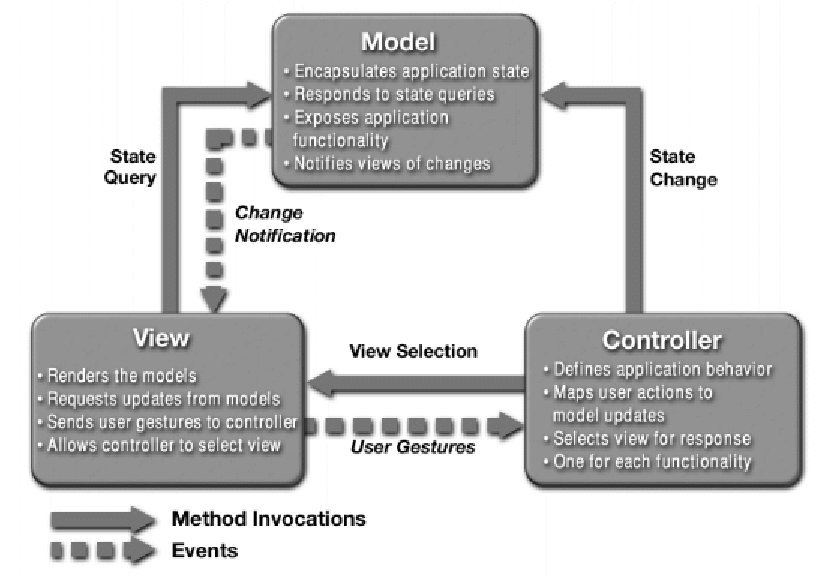
Image result for Model view controller source
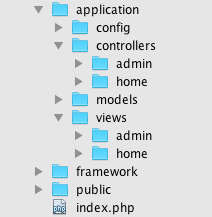
Nhìn source code thì kiểu thế này
Image result for Model view controller source structure
OK, cool, tuy nhiên đem cấu trúc này cho một BA (Business Analysis) thì anh ta lại không hiểu controller, view là cái giề. Anh ấy chỉ biết về nghiệp vụ bán hàng, order online, thanh toán thì đi theo flow abc, xyz. Còn chú coder thì biết mỗi Java, .NET design pattern. Kiểu nhưng 1 anh tàu nói tiếng Chinese với 1 anh US. Như vậy phải có 1 phương pháp nào đó để anh dev và anh BA có thể ngồi được với nhau sử dụng 1 ngôn ngữ chung để cả 2 có thể hiểu, và Domain Driven Design ra đời.

DDD là gì

DDD không phải là công nghệ gì cả, nó là một design pattern, một phương pháp thiết kế phần mềm, nhìn trên góc độ architect. Trong đó ứng dụng sẽ được chia thành 4 layer như ở dưới
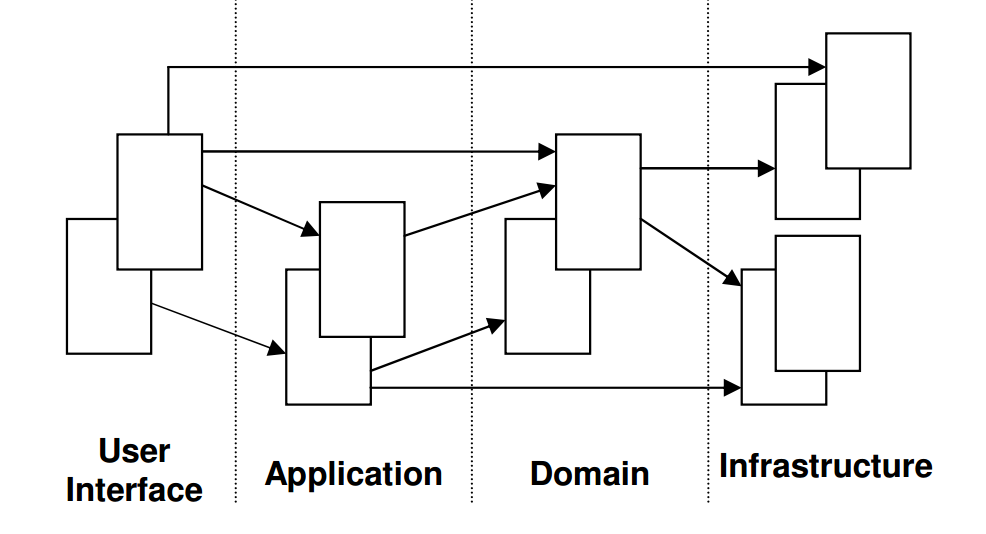
architect
Đoạn định nghĩa này lấy nguồn trên internet cho nhanh
User  Interface Layer:  làm nhiệm vụ biểu diễn thông tin trực quan cho user và dịch các user command ( ở đây chúng ta có thể hiểu là các event xảy ra trên giao diện khi được trigger ( nhấn nút trên các UI input control ) là các sẽ được dịch thành các command xử lý ở các tầng dưới.
Application Layer: Tầng này được thiết kế khá mỏng ( thin ) với ít logic xử  lý chỉ để làm nhiệm vụ coordinate các Activity của Application và không chứa Business Logic, nó không chứa state của các Business Object mà chỉ chứa state của Application Task Progress. Chúng ta có thể hình dung phần này gần giống với các Controller trong mô hình MVC chỉ làm nhiệm vụ forward các task đến nơi cần xử lý.
Domain Layer: Đây là trái tim của ứng dụng ( Business Software ), các  state của Business Object đều nằm ở đây. Việc lưu trữ ( persistence ) các Business Object và các state của nó được chuyển giao cho tầng Infrastructure ở dưới.
Trái tim của mô hình này chính là ở phần Domain Layer, các nghiệp vụ sẽ được mô tả tại đây, và cấu trúc source code cũng được tổ chức theo tên các nghiệp vụ chứ không để kiểu view, controller như truyền thống
Chẳng hạn như Order App thì chia thành thư mục hướng nghiệp vụ như Buyer, Order… Như vậy anh BA nhìn vào có thể hiểu ngay là app này có chức năng gì
Image result for domain driven design source structure
Infrastructure Layer:  Đóng vai trò cung cấp thư viện ( supporting libraries )cho các tầng khác. Nó cung cấp cơ chế giao tiếp ( communication ) giữa các Layer  với nhau, cũng như cung cấp các chức năng khác như lưu trữ ( persistence ) các Business Object của tầng Domain.
Cái tầng Infrastructure Layer dễ làm người đọc lầm lẫn sang hạ tầng phần cứng như máy chủ, database server, nhưng thật ra không phải, do chú tây viết sách thích tỏ ra nguy hiểm. Còn trong DDD, layer này có thể hiểu như tầng common library như logging, utility và phần data persistent layer của tầng Data Access trong mô hình thông thường, tức là vẫn chỉ là phần mềm


DDD vs Mô hình 3 lớp truyền thống

So sánh DDD với mô hình 3 lớp truyền thống có thể ví như cái nhà ống 3 tầng có cấu thang bộ với nhà 4 tầng có thêm thang máy
Mô hình 3 lớp truyền thống, tầng 3 (Presentation) muốn xuống tầng 1 (Data Tier) phải qua tầng 2 Business Tier
Image result for 3 layer architecture
Mô hình DDD thì tầng 4 (UI) muốn xuống tầng 1 (Persistence) có thể qua thang máy là (Infrastructure) để xuống luôn cho nhanh, có muốn tập thể dục thì đi tuần tự từng tầng như truyền thống.
Image result for Domain driven architecture

Thuật ngữ trong DDD

Mỗi lĩnh vực (domain) trong cuộc sống đều có thuật ngữ khác nhau. Dramma hàn quốc thì có thuật ngữ như uppa, ung thư. Kiếm hiệp Hoa Ngữ thì có tuyệt chiêu, bí kíp, kiếm pháp. Chính trị thì có tư tưởng HCM, lý luận Đặng Tiểu Bình, cách mạng, đường lối chính sách. DDD cũng có những thuật ngữ riêng như Entity, Value Object, Aggregate vân vân và mây mây. Cuốn sách của Evic giải thích thì vô cùng khó hiểu. Tuy nhiên giaosucan’s blog sẽ giải thích dần dần cho các bạn những thuật ngữ này theo cách đơn giản nhất trong các phần sau…

Thứ Sáu, 31 tháng 1, 2020

Token Based Authentication In .NET Core And JWT

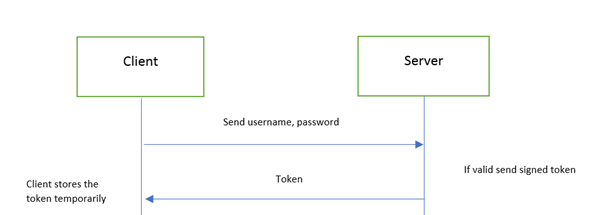
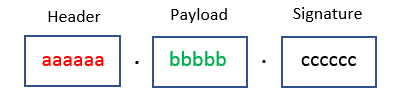
JWT is common format of token-based implementation. it is so popular right now that has become standard for token-based authentication.
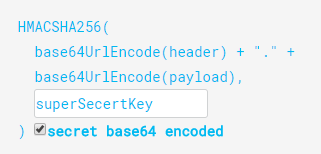
JWT is composed of three components, separate by a dot(.)
Token Based Authentication .NET Core And JWT
Header
Header contains standard information. i.e., type of token and the name of the algorithm. The information is coded in base64 format.
Example -
  1. {  
  2.    "alg": "HS256",  
  3.    "typ": "JWT"  
  4. } 
Payload
Payload is json data contains information of user. It can but does not have to be limited to the data of regarding user, claim and other necessary data can also be there.
Example -
  1. {  
  2.    “issuer”: “http://www.exampleweb.com”,  
  3.    “expires”: “2015-11-18T18:25:43.511Z”  
  4. }  
Signature
Signature is "digital signature" of the combination of header and payload. Signature helps server verify the authenticity of the content of  of JWT against malicious alteration of content.
Token Based Authentication .NET Core And JWT


Implementation 

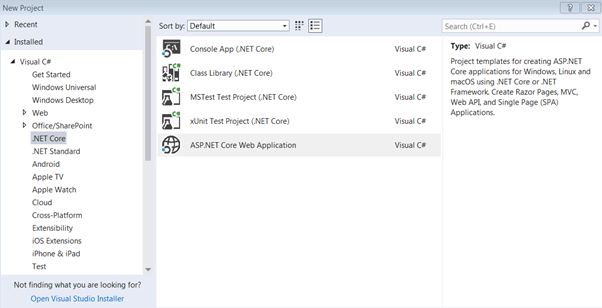
Let’s implement this concept through ASP.NET Core. Open Visual Studio and select .NET Core->ASP.NET Core Web Application.
 
Token Based Authentication .NET Core And JWT
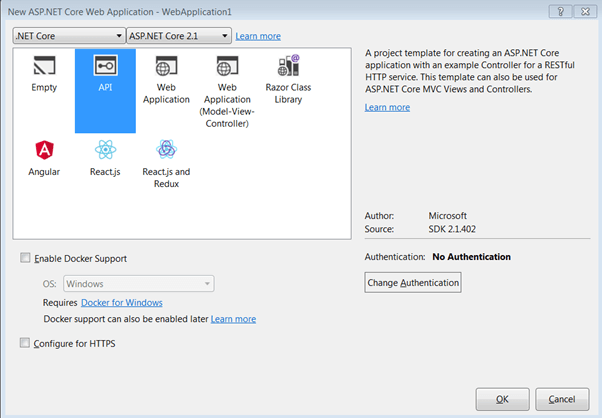
Select “API” project type…
 
Token Based Authentication .NET Core And JWT
 
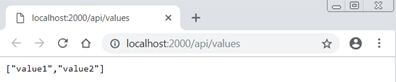
Run the application and probably you will be getting this output 
 
Token Based Authentication .NET Core And JWT
 
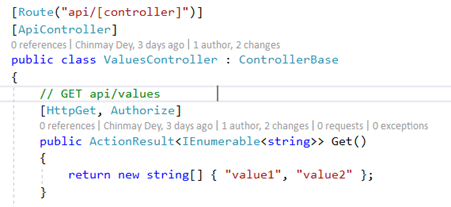
This indicates  thatGET in “values” controller is open to everyone. There are no restrictions at all. Let’s assume we have a scenario that only authenticated users can access this URL. To hide this from the public and be accessible to an authenticated user I will decorate with “Authorize” attribute.
 
Token Based Authentication .NET Core And JWT
 
Also, add authentication in HTTP Request Pipeline. 
  1. public void Configure(IApplicationBuilder app, IHostingEnvironment env)  
  2. {  
  3. .  
  4. .  
  5. .  
  6. app.UseAuthentication();   
  7. app.UseMvc();  
  8. }  
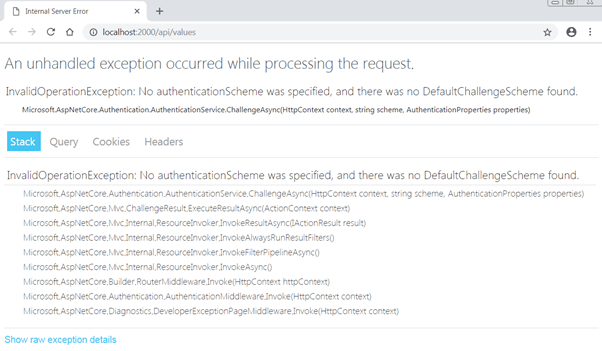
 Now, if you want to access this end, you are probably getting this error.
 
Token Based Authentication .NET Core And JWT
It suggests (ignore the poor implementation of error handling), we are allowing the URL to authenticated users only.
Great, the securing of resource part is done. Next, we need a mechanism to generate a token for valid users. For that, we will add a controller, AuthController, which will ingest login credentials (username and password), validate the user and generate a token.
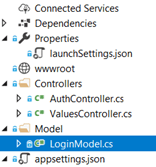
For that, add a model class “LoginModel” to hold “UserName” and “Password” and a new controller, “AuthController”.
 
Token Based Authentication .NET Core And JWT
 
Add this code to “LoginModel”.
  1. public class LoginModel  
  2. {  
  3.     public string UserName { get; set; }  
  4.     public string Password { get; set; }  
  5. }  
Add this code in “AuthController”.
  1. Route("api/[controller]")]  
  2.     [ApiController]  
  3.     public class AuthController : ControllerBase  
  4.     {  
  5.         // GET api/values  
  6.         [HttpPost, Route("login")]  
  7.         public IActionResult Login([FromBody]LoginModel user)  
  8.         {  
  9.             if (user == null)  
  10.             {  
  11.                 return BadRequest("Invalid request");  
  12.             }  
  13.               
  14.             if (user.UserName == "johncitizen" && user.Password == "abc@123")  
  15.             {  
  16.                 var secretKey = new SymmetricSecurityKey(Encoding.UTF8.GetBytes("KeyForSignInSecret@1234"));  
  17.                 var signinCredentials = new SigningCredentials(secretKey, SecurityAlgorithms.HmacSha256);  
  18.   
  19.                 var tokeOptions = new JwtSecurityToken(  
  20.                     issuer: "http://localhost:2000",  
  21.                     audience: "http://localhost:2000",  
  22.                     claims: new List<Claim>(),  
  23.                     expires: DateTime.Now.AddMinutes(30),  
  24.                     signingCredentials: signinCredentials  
  25.                 );  
  26.   
  27.                 var tokenString = new JwtSecurityTokenHandler().WriteToken(tokeOptions);  
  28.                 return Ok(new { Token = tokenString });  
  29.             }  
  30.             else  
  31.             {  
  32.                 return Unauthorized();  
  33.             }  
  34.         }  
  35.     }  
As you can see “AuthController" has a login action which requires “LoginModel” as input for username and password.
Login action validates the user with hardcoded username and password (for the sake for simplicity, although practically this validation should be done through the database). This “token” action generates token and sends to the client if credentials are valid. It will send “unauthorized” error if credentials are not matching.
If you look closely at the structure of the token it contains some necessary information. It has issuer, audience, claims, and expiry time which is part of the payload. “JwtSecurityTokenHandler” takes care of adding header and adding a signature. Note that claims list is empty as I am not implementing role-based authorization in this article.
With this, we have completed the implementation of token generation and sending part.
Token Based Authentication .NET Core And JWT
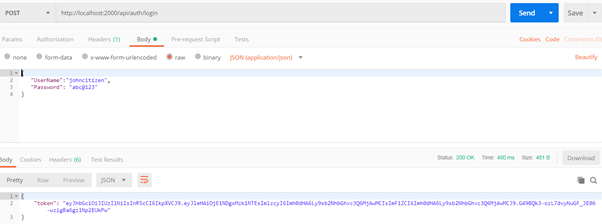
Let’s test this application. We will use “Postman” tool to access the “Login”, pass valid credentials, and get the token.
Now, run the application and to test login, open postman. Change the header, content-type to “application/json”.
 
Token Based Authentication .NET Core And JWT
Add valid username and password (JSON format) in body.
  1. {  
  2.    "UserName":"johncitizen",  
  3.    "Password": "abc@123"  
  4. }   

Token Based Authentication .NET Core And JWT
If you send these details, the server will provide a token.
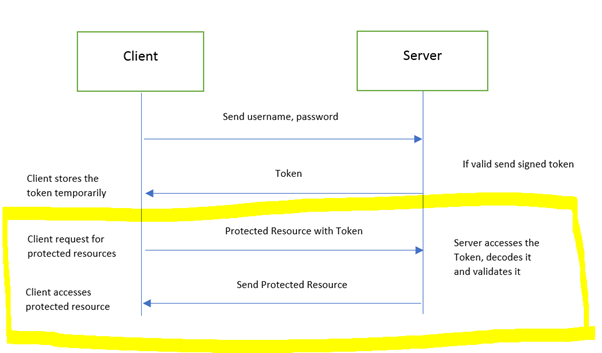
So, by this, we have configured a token providing server. Although we have a token the application is not equipped to handle and interpret the token. We need to add capability, so client request token can be understood by the server.
Add this code in “ConfigureServices” method, in "startup.cs class".
  1. public void ConfigureServices(IServiceCollection services)  
  2.        {  
  3.            services.AddAuthentication(JwtBearerDefaults.AuthenticationScheme)  
  4.            .AddJwtBearer(options =>  
  5.            {  
  6.                options.TokenValidationParameters = new TokenValidationParameters  
  7.                {  
  8.                    ValidateIssuer = true,  
  9.                    ValidateAudience = true,  
  10.                    ValidateLifetime = true,  
  11.                    ValidateIssuerSigningKey = true,  
  12.   
  13.                    ValidIssuer = "http://localhost:2000",  
  14.                    ValidAudience = "http://localhost:2000",  
  15.                    IssuerSigningKey = new SymmetricSecurityKey(Encoding.UTF8.GetBytes("KeyForSignInSecret@1234"))  
  16.                };  
  17.            });  
  18.   
  19.            services.AddMvc().SetCompatibilityVersion(CompatibilityVersion.Version_2_1);  
  20.        }  
If you notice we are making the application aware of JWT authentication and asking to validate token contents; i.e., Issuer, Audience, Lifetime (expiry of the token) and digital signature. Also note we need to supply ValidIssuer, ValidAudience, and IssuerSigningKey exactly the same as we did at the time of writing token generation. The reason behind is token extraction and generation should share the same logic.
This completes the second part of the request, i.e. sending a token to the resource server, authentication and returning resource if the token is valid. 
Token Based Authentication .NET Core And JWT
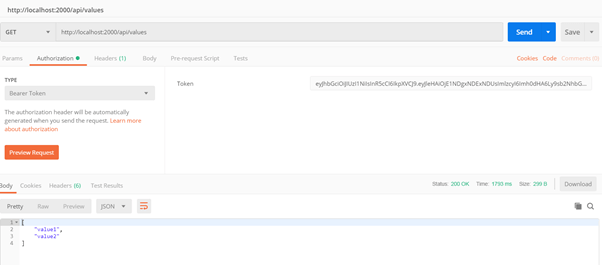
To test this, we will first generate the token (through login URL and user credentials) in postman (like we did before), copy the token.
Open another postman tab/instance, put values URL, select type “Bearer Token” and paste the above-generated token. Send the request and you should get the response. 
 
Token Based Authentication .NET Core And JWT
 
Happy coding!!!